Setting up the Wokwi simulator#
Wokwi is an electronic kit simulator, including a simulation of the Wi-Fi of the ESP32, so you can use UCUq without physical kits.
Launch the simulation on Wokwi#
On the page dedicated to a kit, you will find a link to the corresponding Wokwi simulation. Open the simulation in a separate window, or even on another device. Go to the ucuq.json tab and give any value (not too trivial and consisting only of numbers and unaccented letters) to each of the two empty strings in the Identification input (arrows ‘Token’ and ‘Id’).
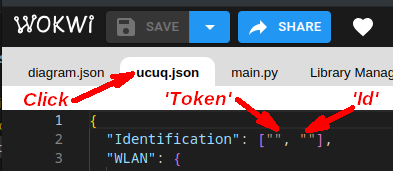
Start the simulation by clicking on the green button. Leave this window open.
On some devices, particularly those running Android or iOS, the simulator may be quite slow. Disabling translation may also make the simulator easier to use.
If necessary, on Android or iOS, you can use the split-screen feature in conjunction with another browser, such as Firefox, Edge, etc.
Configuration#
Enter in the field below the Token and Id you choose for the Wokwi simulation separated by a colon (:), then click the ✔ button.